Algae Photobioreactor
The Algae Photobioreactor grows  Algae Biomass from water, a carbon-bearing gas, and light. It uses no power. Three glass columns hold a living algae culture, with carbon gas bubbling up through them; the harvest settles in a tank at the back. Algae Biomass is fuel for the Bio Generator and a feedstock for methane in the Melter.
It is a Stage 3–4 support machine that turns early gas byproducts into fuel. It has no rarity, affixes, or Refinement of its own; an installed Bio Chamber is what improves it.
Obtaining
Crafting
The recipe uses up a  Bio Chamber. You need a second Bio Chamber if you want one in the Gear slot.
| Ingredients | Crafting recipe |
|---|---|
| Glass + Basic Electric Circuit + Casing + Machine Frame + Iron Ingot + Bio Chamber |      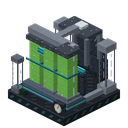 |
Breaking
Mine the Photobioreactor with a pickaxe. It drops itself plus the items in its slots.
Usage
Growing algae
The Photobioreactor has two input tanks of 4,000 mB each:
- a Water tank.
- a Carbon tank that takes Carbon Exhaust, Syngas, or Carbon Monoxide.
Fill them with buckets in the container slots, or pipe fluid into the sides. Each cycle uses a little of both and makes one Algae Biomass. Facing the front, the sight glass at the back right shows the water level, and the one at the back left shows the carbon gas.
Algae needs light. The block directly above the Photobioreactor must have a light level of 12 or more, either from open sky or from a light source such as a torch or Glowstone. If it is too dark, the machine shows a low-light status and waits. The white light sensor on top glows when there is enough light.
The culture
The algae live in the columns as a culture. Its density (0 to 100%) shows on the Process tab and as the colour in the columns: pale yellow-green when thin, deep green when dense. Growth runs at the culture's density:
- A new Photobioreactor seeds itself at 5% once it has water, light, and carbon gas. The culture grows to full density in about one cycle, so the first Algae Biomass takes longer than the rest.
- Without light, water, or carbon gas, the culture slowly dies back toward 5%. It loses half its density in about five minutes. The current cycle's progress is kept, so it picks up where it left off when supplies return, but it needs time to thicken again.
- A full output slot only pauses the harvest. The culture stays as it is.
A steady supply keeps the culture full and the Photobioreactor at its best rate.
Aeration
Aeration sets how much carbon gas bubbles through the columns. Set it from 40% to 100% by clicking or scrolling on the aeration gauge on the Process tab (hold Shift to step by 5). The rotameter on the front shows the setting: its float rides higher at higher aeration.
More gas makes the algae grow faster, but the gain gets smaller as it rises, so each Algae Biomass costs more gas:
| Aeration | Growth speed | Carbon per Algae Biomass |
|---|---|---|
| 40% (lean) | ×0.80 | ×0.71 |
| 50% | ×0.88 | ×0.81 |
| 70% (rated, default) | ×1.00 | ×1.00 |
| 85% | ×1.06 | ×1.14 |
| 100% (rich) | ×1.11 | ×1.29 |
Water per Algae Biomass does not change. Use lean aeration when carbon gas is scarce, and rich aeration to burn through spare Carbon Monoxide faster. Hover the gauge to see the carbon one Algae Biomass uses at the current setting. The tank must hold that much gas for growth to continue.
The carbon gas you choose sets the speed:
The times and amounts below are for a full culture at rated aeration.
| Carbon input | Per Algae Biomass | Time | Role |
|---|---|---|---|
| Carbon Exhaust | 100 mB | 1,200 ticks | Starter input. |
| Syngas | 80 mB | 900 ticks | Faster intermediate input. |
| Carbon Monoxide | 500 mB | 600 ticks | Fastest, and burns through a lot of gas. Good for getting rid of spare Carbon Monoxide. |
Every recipe also uses 250 mB of water. Algae growth uses the rngtech:algae_growth recipe type.
| Input | Output | Time | Min. light | |
|---|---|---|---|---|
 250 250 100 100 | → | | 60 s | 12 |
250 500 500 | → | | 30 s | 12 |
250 80 80 | → | | 45 s | 12 |
Urea
The Process tab has an optional  Urea slot, to the right of the Algae Biomass output. Urea comes from the Ammonia Synthesizer. The Photobioreactor takes one Urea at a time, and each one makes the next 4 Algae Biomass grow at twice the speed. Water and carbon gas per Algae Biomass do not change. Hover the empty Urea slot to see how many boosted harvests are left.
Getting carbon gas
- Carbon Exhaust: make it in a Wooden Dehumidifier from Coal Dust or Gasification Residue, burn Syngas in a Syngas Combustor, shift Carbon Monoxide in a Steam Methane Reformer, or capture it from a Bio Generator with a Fluid Pump and a Biogas Membrane. To bootstrap, craft a Carbon Exhaust Bucket from a Water Bucket and one
 Coal Dust. You get Coal Dust by crushing coal in a Crusher.
 - Syngas: from the Coal Gasifier.
- Carbon Monoxide: a byproduct of the Steam Methane Reformer.
Gear
The Gear tab has one optional Bio Chamber slot. The chamber's fuel-efficiency rolls become Bio Conversion, which raises how much algae each cycle produces. Partial bonus algae carries over between cycles, so even a small bonus pays off over time. Without a chamber, each cycle makes exactly one Algae Biomass.
Using Algae Biomass
- Burn it in the Bio Generator for 400 FE base.
- Craft four into one
 Dense Algae Biomass, worth 2,400 FE base in the Bio Generator instead of 1,600 FE for the four pieces burned separately.
 - Melt it with Organic Reagent and water in the Melter to make methane.
Neither algae item burns in a vanilla furnace or a Solid Fuel Burner.
| Ingredients | Crafting recipe |
|---|---|
| Algae Biomass | ⇄ |
You can also put Algae Biomass into the output slot yourself, by hand or from the sides, to top up a partial stack.
Automation
| Side | Behavior |
|---|---|
| Top and sides | Fill the water and carbon tanks with fluid. Insert filled water or carbon-gas containers. Insert Algae Biomass into the output slot and Urea into the Urea slot. |
| Bottom | Extracts Algae Biomass and empty containers. |
Pipes cannot drain fluid back out of the tanks. The Photobioreactor has no FE connection, and the Bio Chamber slot is not reachable by automation. The back of the machine has a port plate sized for a Universal Connector, the tidiest place to attach one.
To throw fluid away, use the purge buttons beside each tank, or right-click the machine with a  Purge Bucket to void up to 1,000 mB. Purging either tank resets the current growth cycle.
Screen
The Algae Photobioreactor screen has three tabs:
- Process: water and carbon tanks with purge buttons, the container slots, the output slot, the Urea slot, progress, the light level, the culture density, and the aeration gauge. Hover for amounts, the light requirement, and what the aeration setting does.
- Gear: the Bio Chamber slot.
- Stats: the machine's current stats.
Data values
| Name | Resource location | Form | Translation key |
|---|---|---|---|
| Algae Photobioreactor | rngtech:algae_photobioreactor | Block | block.rngtech.algae_photobioreactor |
See also
- Bio Generator
- Wooden Dehumidifier: water and Carbon Exhaust.
RNGTech wiki
| Guides |  Automation · Automation ·  Battery Cells · Battery Cells ·  Dormant Machines · Dormant Machines ·  Gear · Gear ·  Getting Started · Getting Started ·  Heat · Heat ·  Machine Mastery · Machine Stats · Machine Mastery · Machine Stats ·  Modpack Creators · Modpack Creators ·  Power Chains · Power Chains ·  Rarity and Affixes · Rarity and Affixes ·  Stages · Stages ·  Uniques Uniques |
|---|---|
| Processing |  Alloy Furnace · Alloy Furnace ·  Component Assembler · Component Assembler ·  Component Recycler · Component Recycler ·  Crusher · Crusher ·  Furnace · Furnace ·  Melter · Melter ·  Metal Press · Metal Press ·  Resonance Calibrator · Resonance Calibrator ·  Wooden Composter Wooden Composter |
| Power generation |  Bio Generator · Bio Generator ·  Cavitation Generator · Cavitation Generator ·  Corrosion Cell · Corrosion Cell ·  Fuel Cell · Fuel Cell ·  Potential Reactor · Potential Reactor ·  Solar Panel · Solar Panel ·  Solid Fuel Burner · Syngas Combustor · Solid Fuel Burner · Syngas Combustor ·  Vacuum Collapse Generator Vacuum Collapse Generator |
| Energy storage |  Battery Chassis Battery Chassis |
| Fluids and gases | Algae Photobioreactor ·  Ammonia Synthesizer · Ammonia Synthesizer ·  Coal Gasifier · Coal Gasifier ·  Fluid and Compressor Tanks · Fluid and Compressor Tanks ·  Silica Gel Dehumidifier · Silica Gel Dehumidifier ·  Steam Methane Reformer · Steam Methane Reformer ·  Wooden Dehumidifier Wooden Dehumidifier |
| Refinement |  Affix Forge · Affix Forge ·  Exotic Affix Forge Exotic Affix Forge |
| Logistics |  Universal Cable Universal Cable |
| Tools |  Forestry Cart Station · Forestry Cart Station ·  Miner's Companion · Miner's Companion ·  Modular Tools · Modular Tools ·  Tool Bench Tool Bench |